---
title: uicast documentation
description: The expression-driven generative UI framework.
pages: 27
chars: 227038
est_tokens: 56760
---
Page: https://uicast.dev/about
# About uicast
The expression-driven generative UI framework: open source under the MIT License,
in beta. The whole documentation is also one Markdown file for LLMs:
[llms-full.txt](https://uicast.dev/llms-full.txt).
1. **Define components, functions.** Your design system and your endpoints, each behind a schema: the closed set the model builds from.
2. **AI generates.** Derived values, visibility and events are short JavaScript expressions, checked before they run.
3. **Get an app, logic included.** Elements mount as they arrive. Clicks run callbacks that call your functions and write reactive state.
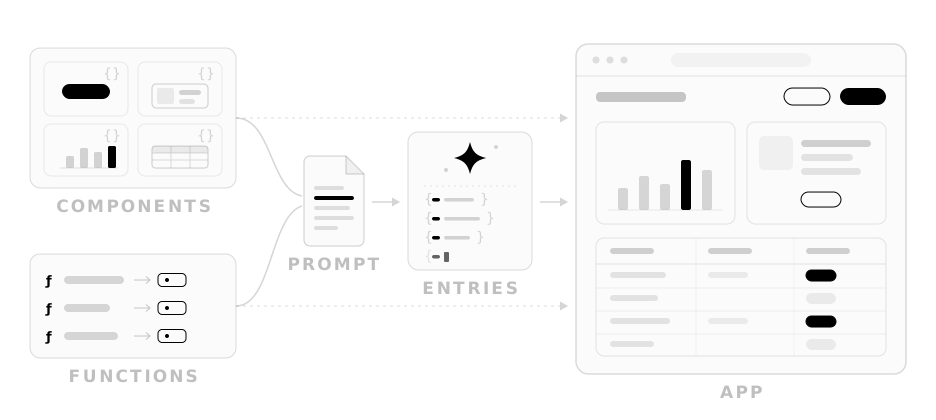
## The model as your front-end developer
**uicast is a UI framework whose language is written by models, not people.**
It gives a model what JSX gives a developer — components, state, events — but
is built to be reliable to generate rather than easy to maintain. The model's
output is data: the engine turns it into a working front-end app, with no build
or deploy step per page.
The demo's prompts, each with the entries the model wrote for it. The entries call these host functions:
```md
# Available Functions
listOrders, refundOrder, updateOrder, listProducts, placeOrder, listWarehouses, getSlots, bookSlot
## Function Details
- listOrders() => {
id: number /* integer */;
customer: string;
total: number;
status: "pending" | "paid" | "shipped" | "refunded";
}[]: Every order this week, newest first.
- refundOrder({
id: number /* integer */;
}) => unknown: Refund one order.
- updateOrder({
id: number /* integer */;
status: "pending" | "paid" | "shipped" | "refunded";
}) => unknown: Change one order's status.
- listProducts() => {
id: number /* integer */;
name: string;
price: number;
image: string /* format uri */;
}[]: Everything the shop sells.
- placeOrder({
productIds: (number /* integer */)[];
}) => {
id: number /* integer */;
}: Order these products, one id per item.
- listWarehouses() => {
city: string;
lat: number;
lng: number;
units: number /* integer */;
lowStockItems: number /* integer */;
shippedToday: number /* integer */;
}[]: Every warehouse, with its stock.
- getSlots({
date?: string /* format date */;
}) => {
date: string /* format date */;
label: string /* The date written out, as in Thu, Oct 2 */;
slots: {
time: string;
free: boolean;
}[];
}: Delivery slots on one day, from tomorrow on. Tomorrow's when no date is given.
- bookSlot({
date: string /* format date */;
time: string;
}) => unknown: Book one delivery slot.
```
Prompt: Show this week's orders, with refund buttons.
```jsonl
{"key":"root","component":"FlexCol","props":{"literal":{"gap":"3"}},"seed":[{"set":"scopes.root.orders","expr":"listOrders()"},{"set":"scopes.root.status","literal":"all"}],"children":["header","stats","table"]}
{"key":"header","component":"FlexRow","props":{"literal":{"justify":"between","align":"center"}},"children":["heading","filter"]}
{"key":"heading","component":"FlexCol","props":{"literal":{"gap":"0"}},"children":["title","subtitle"]}
{"key":"title","component":"Heading","props":{"literal":{"level":"4","text":"Orders"}}}
{"key":"subtitle","component":"Typography","props":{"literal":{"text":"This week","variant":"muted"}}}
{"key":"filter","component":"ToggleGroup","props":{"expr":"({ value: scopes.root.status, variant: 'outline', size: 'sm', items: [{ value: 'all', label: 'All' }, { value: 'paid', label: 'Paid' }, { value: 'shipped', label: 'Shipped' }, { value: 'refunded', label: 'Refunded' }] })"},"callbacks":{"onChange":[{"set":"scopes.root.status","expr":"evt.value || currentValue"}]}}
{"key":"stats","component":"Grid","props":{"literal":{"columns":"3","gap":"3"}},"children":["revenue","count","refunded"]}
{"key":"revenue","component":"Stat","props":{"expr":"({ label: 'Revenue', value: '$' + scopes.root.orders.filter(o => ['paid', 'shipped'].includes(o.status)).reduce((sum, o) => sum + o.total, 0).toFixed(2) })"}}
{"key":"count","component":"Stat","props":{"expr":"({ label: 'Orders', value: scopes.root.orders.length })"}}
{"key":"refunded","component":"Stat","props":{"expr":"({ label: 'Refunded', value: '$' + scopes.root.orders.filter(o => o.status === 'refunded').reduce((sum, o) => sum + o.total, 0).toFixed(2) })"}}
{"key":"table","component":"Table","children":["head","body"]}
{"key":"head","component":"TableHeader","children":["head-row"]}
{"key":"head-row","component":"TableRow","children":["h-customer","h-total","h-status","h-action"]}
{"key":"h-customer","component":"TableHead","props":{"literal":{"text":"Customer"}}}
{"key":"h-total","component":"TableHead","props":{"literal":{"text":"Total"}}}
{"key":"h-status","component":"TableHead","props":{"literal":{"text":"Status"}}}
{"key":"h-action","component":"TableHead","props":{"literal":{"text":""}}}
{"key":"body","component":"TableBody","children":["row"]}
{"key":"row","component":"TableRow","each":"scopes.root.orders.filter(o => scopes.root.status === 'all' || o.status === scopes.root.status)","as":"order","keyBy":"id","children":["customer","total","status","action"]}
{"key":"customer","component":"TableCell","props":{"expr":"({ text: scopes.order.customer })"}}
{"key":"total","component":"TableCell","props":{"expr":"({ text: '$' + scopes.order.total.toFixed(2) })"}}
{"key":"status","component":"TableCell","children":["badge"]}
{"key":"badge","component":"Badge","props":{"expr":"({ text: scopes.order.status, variant: { paid: 'secondary', shipped: 'default', pending: 'outline', refunded: 'destructive' }[scopes.order.status] })"}}
{"key":"action","component":"TableCell","children":["refund"]}
{"key":"refund","component":"Button","props":{"expr":"({ text: 'Refund', variant: 'outline', size: 'sm', disabled: !['paid', 'shipped'].includes(scopes.order.status) })"},"callbacks":{"onClick":[{"confirm":"Refund this order?","expr":"refundOrder({ id: scopes.order.id })"},{"set":"scopes.root.orders","expr":"listOrders()"}]}}
```
Prompt: Orders to ship, as a kanban I can drag.
```jsonl
{"key":"root","component":"FlexCol","props":{"literal":{"gap":"3"}},"seed":[{"set":"scopes.root.orders","expr":"listOrders()"},{"set":"scopes.root.columns","expr":"['paid', 'shipped'].map(status => ({ id: status, title: { paid: 'To ship', shipped: 'Shipped' }[status], cards: scopes.root.orders.filter(o => o.status === status).map(o => ({ id: String(o.id), title: o.customer, description: '#' + o.id + ' · $' + o.total.toFixed(2) })) }))"}],"children":["header","board"]}
{"key":"header","component":"FlexRow","props":{"literal":{"justify":"between","align":"center"}},"children":["heading","count"]}
{"key":"heading","component":"FlexCol","props":{"literal":{"gap":"0"}},"children":["title","subtitle"]}
{"key":"title","component":"Heading","props":{"literal":{"level":"4","text":"Fulfillment"}}}
{"key":"subtitle","component":"Typography","props":{"literal":{"text":"Drag orders between columns","variant":"muted"}}}
{"key":"count","component":"Badge","props":{"expr":"({ text: scopes.root.columns[0].cards.length + ' to ship', variant: 'secondary' })"}}
{"key":"board","component":"KanbanBoard","props":{"expr":"({ columns: scopes.root.columns })"},"callbacks":{"onCardMove":[{"set":"scopes.root.columns","expr":"evt.columns"},{"expr":"updateOrder({ id: Number(evt.cardId), status: evt.toColumnId })"}]}}
```
Prompt: Map our warehouses. Click one to see its stock.
```jsonl
{"key":"root","component":"FlexCol","props":{"literal":{"gap":"3"}},"seed":[{"set":"scopes.root.warehouses","expr":"listWarehouses()"},{"set":"scopes.root.selected","expr":"scopes.root.warehouses[0]"}],"children":["heading","map","details"]}
{"key":"heading","component":"FlexCol","props":{"literal":{"gap":"0"}},"children":["title","subtitle"]}
{"key":"title","component":"Heading","props":{"literal":{"level":"4","text":"Warehouses"}}}
{"key":"subtitle","component":"Typography","props":{"expr":"({ variant: 'muted', text: scopes.root.warehouses.length + ' sites · ' + scopes.root.warehouses.reduce((sum, w) => sum + w.units, 0).toLocaleString() + ' units · click a pin' })"}}
{"key":"map","component":"LocationMap","props":{"expr":"({ width: 380, height: 190, markers: scopes.root.warehouses.map(w => ({ lat: w.lat, lng: w.lng, label: w.city, active: w.city === scopes.root.selected.city })) })"},"callbacks":{"onMarkerClick":[{"set":"scopes.root.selected","expr":"scopes.root.warehouses.find(w => w.city === evt.label)"}]}}
{"key":"details","component":"Card","props":{"expr":"({ title: scopes.root.selected.city })"},"children":["stock"]}
{"key":"stock","component":"DescriptionList","props":{"expr":"({ columns: '3', items: [{ label: 'Units in stock', value: scopes.root.selected.units.toLocaleString() }, { label: 'Low-stock items', value: String(scopes.root.selected.lowStockItems) }, { label: 'Shipped today', value: String(scopes.root.selected.shippedToday) }] })"}}
```
Prompt: Let customers book a delivery slot.
```jsonl
{"key":"root","component":"FlexCol","props":{"literal":{"gap":"3"}},"seed":[{"set":"scopes.root.day","expr":"getSlots({})"},{"set":"scopes.root.first","expr":"scopes.root.day.date"},{"set":"scopes.root.booked","literal":null}],"children":["heading","row","done"]}
{"key":"heading","component":"FlexCol","props":{"literal":{"gap":"0"}},"children":["title","subtitle"]}
{"key":"title","component":"Heading","props":{"literal":{"level":"4","text":"Schedule delivery"}}}
{"key":"subtitle","component":"Typography","props":{"literal":{"text":"Pick a day, then a time","variant":"muted"}}}
{"key":"row","component":"FlexRow","props":{"literal":{"gap":"4","wrap":true,"align":"start"}},"children":["calendar","times"]}
{"key":"calendar","component":"Calendar","props":{"expr":"({ selected: scopes.root.day.date, min: scopes.root.first })"},"callbacks":{"onSelect":[{"set":"scopes.root.booked","literal":null},{"set":"scopes.root.day","expr":"getSlots({ date: evt.date })"}]}}
{"key":"times","component":"Card","props":{"expr":"({ title: scopes.root.day.label, description: scopes.root.day.slots.filter(s => s.free).length + ' slots free' })"},"children":["slots"]}
{"key":"slots","component":"Grid","props":{"literal":{"columns":"2","gap":"2"}},"children":["slot"]}
{"key":"slot","component":"Button","each":"scopes.root.day.slots","as":"slot","keyBy":"time","props":{"expr":"({ text: scopes.slot.time, size: 'sm', variant: scopes.slot.time === scopes.root.booked ? 'default' : 'outline', disabled: !scopes.slot.free || !!scopes.root.booked })"},"callbacks":{"onClick":[{"confirm":"Book this delivery slot?","expr":"bookSlot({ date: scopes.root.day.date, time: scopes.slot.time })"},{"set":"scopes.root.booked","expr":"scopes.slot.time"},{"set":"scopes.root.day","expr":"getSlots({ date: scopes.root.day.date })"}]}}
{"key":"done","component":"Alert","hidden":"!scopes.root.booked","props":{"expr":"({ status: 'success', title: 'Delivery booked', description: scopes.root.day.label + ' at ' + scopes.root.booked })"}}
```
Prompt: A shop page for our coffee, with a cart.
```jsonl
{"key":"root","component":"FlexCol","props":{"literal":{"gap":"3"}},"seed":[{"set":"scopes.root.products","expr":"listProducts()"},{"set":"scopes.root.cart","literal":[]},{"set":"scopes.root.placed","literal":null}],"children":["header","done","grid"]}
{"key":"header","component":"FlexRow","props":{"literal":{"justify":"between","align":"center"}},"children":["heading","checkout"]}
{"key":"heading","component":"FlexCol","props":{"literal":{"gap":"0"}},"children":["title","subtitle"]}
{"key":"title","component":"Heading","props":{"literal":{"level":"4","text":"Shop"}}}
{"key":"subtitle","component":"Typography","props":{"expr":"({ variant: 'muted', text: scopes.root.cart.length ? scopes.root.cart.length + ' in cart' : 'Your cart is empty' })"}}
{"key":"checkout","component":"Button","props":{"expr":"({ icon: 'ShoppingCart', text: 'Checkout $' + scopes.root.cart.reduce((sum, id) => sum + scopes.root.products.find(p => p.id === id).price, 0).toFixed(2), disabled: !scopes.root.cart.length })"},"callbacks":{"onClick":[{"confirm":"Place this order?","set":"scopes.root.placed","expr":"placeOrder({ productIds: scopes.root.cart })"},{"set":"scopes.root.cart","literal":[]}]}}
{"key":"done","component":"Alert","hidden":"!scopes.root.placed","props":{"expr":"({ status: 'success', title: 'Order placed', description: 'Order #' + scopes.root.placed?.id + ' is confirmed.' })"}}
{"key":"grid","component":"Grid","props":{"literal":{"columns":"3","gap":"4"}},"children":["product"]}
{"key":"product","component":"FlexCol","each":"scopes.root.products","as":"product","keyBy":"id","props":{"literal":{"gap":"2"}},"children":["photo","text","controls"]}
{"key":"photo","component":"Picture","props":{"expr":"({ src: scopes.product.image, alt: scopes.product.name, height: 'lg' })"}}
{"key":"text","component":"FlexCol","props":{"literal":{"gap":"0"}},"children":["name","price"]}
{"key":"name","component":"Typography","props":{"expr":"({ text: scopes.product.name, variant: 'small' })"}}
{"key":"price","component":"Typography","props":{"expr":"({ text: '$' + scopes.product.price.toFixed(2), variant: 'muted' })"}}
{"key":"controls","component":"FlexRow","props":{"literal":{"align":"center","gap":"3"}},"children":["remove","qty","add"]}
{"key":"remove","component":"Button","hidden":"!scopes.root.cart.includes(scopes.product.id)","props":{"literal":{"icon":"Minus","size":"sm","variant":"outline","tooltip":"Remove one"}},"callbacks":{"onClick":[{"set":"scopes.root.cart","expr":"scopes.root.cart.toSpliced(scopes.root.cart.indexOf(scopes.product.id), 1)"}]}}
{"key":"qty","component":"Typography","hidden":"!scopes.root.cart.includes(scopes.product.id)","props":{"expr":"({ variant: 'small', text: String(scopes.root.cart.filter(id => id === scopes.product.id).length) })"}}
{"key":"add","component":"Button","props":{"expr":"scopes.root.cart.includes(scopes.product.id) ? { icon: 'Plus', size: 'sm', variant: 'outline', tooltip: 'Add one' } : { icon: 'Plus', size: 'sm', variant: 'outline', text: 'Add' }"},"callbacks":{"onClick":[{"set":"scopes.root.cart","expr":"[...scopes.root.cart, scopes.product.id]"},{"set":"scopes.root.placed","literal":null}]}}
```
Prompt: Loan calculator with a payoff chart.
```jsonl
{"key":"root","component":"FlexCol","props":{"literal":{"gap":"4"}},"seed":[{"set":"scopes.root.amount","literal":300000},{"set":"scopes.root.rate","literal":5.5},{"set":"scopes.root.years","literal":25}],"children":["heading","top","chart"]}
{"key":"heading","component":"FlexCol","props":{"literal":{"gap":"0"}},"children":["title","subtitle"]}
{"key":"title","component":"Heading","props":{"literal":{"level":"4","text":"Mortgage calculator"}}}
{"key":"subtitle","component":"Typography","props":{"literal":{"text":"Monthly payment and payoff","variant":"muted"}}}
{"key":"top","component":"Grid","props":{"literal":{"columns":"2","gap":"6"}},"children":["inputs","stats"]}
{"key":"inputs","component":"FlexCol","props":{"literal":{"gap":"4"}},"children":["amount","rate","years"]}
{"key":"amount","component":"Field","children":["amount-label","amount-slider"]}
{"key":"amount-label","component":"FieldLabel","props":{"expr":"({ text: 'Amount: $' + scopes.root.amount.toLocaleString() })"}}
{"key":"amount-slider","component":"Slider","props":{"expr":"({ value: scopes.root.amount, min: 50000, max: 1000000, step: 10000 })"},"callbacks":{"onChange":[{"set":"scopes.root.amount","expr":"evt.value"}]}}
{"key":"rate","component":"Field","children":["rate-label","rate-slider"]}
{"key":"rate-label","component":"FieldLabel","props":{"expr":"({ text: 'Rate: ' + scopes.root.rate.toFixed(1) + '%' })"}}
{"key":"rate-slider","component":"Slider","props":{"expr":"({ value: scopes.root.rate, min: 1, max: 10, step: 0.1 })"},"callbacks":{"onChange":[{"set":"scopes.root.rate","expr":"evt.value"}]}}
{"key":"years","component":"Field","children":["years-label","years-slider"]}
{"key":"years-label","component":"FieldLabel","props":{"expr":"({ text: 'Term: ' + scopes.root.years + ' years' })"}}
{"key":"years-slider","component":"Slider","props":{"expr":"({ value: scopes.root.years, min: 5, max: 30 })"},"callbacks":{"onChange":[{"set":"scopes.root.years","expr":"evt.value"}]}}
{"key":"stats","component":"FlexCol","props":{"literal":{"gap":"4"}},"children":["monthly","interest"]}
{"key":"monthly","component":"Stat","props":{"expr":"({ label: 'Monthly payment', value: '$' + Math.round(scopes.root.amount * scopes.root.rate / 1200 / (1 - (1 + scopes.root.rate / 1200) ** -(scopes.root.years * 12))).toLocaleString() })"}}
{"key":"interest","component":"Stat","props":{"expr":"({ label: 'Total interest', value: '$' + Math.round(scopes.root.amount * scopes.root.rate / 1200 / (1 - (1 + scopes.root.rate / 1200) ** -(scopes.root.years * 12)) * scopes.root.years * 12 - scopes.root.amount).toLocaleString() })"}}
{"key":"chart","component":"LineChart","props":{"expr":"({ data: Array.from({ length: scopes.root.years + 1 }, (_, year) => ({ year, balance: Math.round(scopes.root.amount * ((1 + scopes.root.rate / 1200) ** (scopes.root.years * 12) - (1 + scopes.root.rate / 1200) ** (year * 12)) / ((1 + scopes.root.rate / 1200) ** (scopes.root.years * 12) - 1)) })), xKey: 'year', yKeys: ['balance'], height: 160, curved: true, filled: true })"}}
```
Prompt: A QR code our guests scan to join the Wi-Fi.
```jsonl
{"key":"root","component":"FlexCol","props":{"literal":{"gap":"3"}},"seed":[{"set":"scopes.root.ssid","literal":"Office Guest"},{"set":"scopes.root.security","literal":"WPA"},{"set":"scopes.root.password","literal":"welcome-2026"}],"children":["heading","body"]}
{"key":"heading","component":"FlexCol","props":{"literal":{"gap":"0"}},"children":["title","subtitle"]}
{"key":"title","component":"Heading","props":{"literal":{"level":"4","text":"Guest Wi-Fi"}}}
{"key":"subtitle","component":"Typography","props":{"literal":{"text":"A card guests scan to join","variant":"muted"}}}
{"key":"body","component":"Grid","props":{"literal":{"columns":"2","gap":"6"}},"children":["form","card"]}
{"key":"form","component":"FlexCol","props":{"literal":{"gap":"4"}},"children":["ssid","security","password"]}
{"key":"ssid","component":"Field","children":["ssid-label","ssid-input"]}
{"key":"ssid-label","component":"FieldLabel","props":{"literal":{"text":"Network name"}}}
{"key":"ssid-input","component":"Input","props":{"expr":"({ value: scopes.root.ssid })"},"callbacks":{"onChange":[{"set":"scopes.root.ssid","expr":"evt.value"}]}}
{"key":"security","component":"Field","children":["security-label","security-select"]}
{"key":"security-label","component":"FieldLabel","props":{"literal":{"text":"Security"}}}
{"key":"security-select","component":"Select","props":{"expr":"({ value: scopes.root.security, options: [{ label: 'WPA/WPA2', value: 'WPA' }, { label: 'WEP', value: 'WEP' }, { label: 'None', value: 'nopass' }] })"},"callbacks":{"onChange":[{"set":"scopes.root.security","expr":"evt.value"}]}}
{"key":"password","component":"Field","hidden":"scopes.root.security === 'nopass'","children":["password-label","password-input"]}
{"key":"password-label","component":"FieldLabel","props":{"literal":{"text":"Password"}}}
{"key":"password-input","component":"Input","props":{"expr":"({ value: scopes.root.password })"},"callbacks":{"onChange":[{"set":"scopes.root.password","expr":"evt.value"}]}}
{"key":"card","component":"Card","props":{"expr":"({ title: scopes.root.ssid, description: scopes.root.security === 'nopass' ? 'Open network' : 'Password: ' + scopes.root.password })"},"children":["qr"]}
{"key":"qr","component":"QRCode","props":{"expr":"({ size: 140, value: 'WIFI:T:' + scopes.root.security + ';S:' + scopes.root.ssid + ';' + (scopes.root.security === 'nopass' ? '' : 'P:' + scopes.root.password + ';') + ';' })"}}
```
## Expressions hold the logic
What makes **uicast** different is **expressions**: computed values, visibility
and event handling are JavaScript, run by a [closed-grammar interpreter](https://uicast.dev/expr).
**Entries** (the LLM generates):
```jsonl
{"key":"counter","component":"Counter","seed":[{"set":"scopes.root.count","literal":0}],"props":{"expr":"({ count: scopes.root.count })"},"callbacks":{"onClick":[{"set":"scopes.root.count","expr":"currentValue + 1"}]}}
```
**Definition**, `def.ts` (you provide):
```ts
import z from "zod";
import { createComponentDefinition } from "@uicast/core";
export const CounterDef = createComponentDefinition({
name: "Counter",
description: "A button that shows a number and increments it on each click.",
props: z.object({
count: z.number().default(0).meta({ description: "The number to display" }),
}),
callbacks: {
onClick: z.null().meta({ description: "Fires when the counter is pressed" }),
},
});
```
**Implementation**, `impl.tsx` (you provide):
```tsx
import { createComponentImplementation } from "@uicast/react";
import { Button } from "@/components/ui/button";
import { CounterDef } from "./def";
export const CounterImpl = createComponentImplementation({
def: CounterDef,
render: ({ count, onClick }) => (
),
});
```
**Partial prompt** (generated from definition):
```md
# Available Components
Counter
## Component Details
- Counter — A button that shows a number and increments it on each click.
Props:
- count?: number = 0 — The number to display
Event handlers:
- onClick() — Fires when the counter is pressed
```
**Renderer**, `renderer.tsx` (you mount it):
```tsx
"use client";
import { Evaluator } from "@uicast/expr";
import { EntriesRenderer, RendererProvider } from "@uicast/react";
import { CounterImpl } from "./impl";
import counterEntries from "./entries.json";
const implementations = [CounterImpl];
const evaluator = new Evaluator();
export function Counter() {
return (
);
}
```
Structured generation offers a fixed set of bindings and operators instead, so a
calculation outside that set needs a code change.
| Approach | Predictability | Expressiveness | Model code |
| --- | --- | --- | --- |
| Raw code generation | low | unlimited | any |
| **uicast** | high | high | expressions |
| Structured generation ([json-render](https://github.com/vercel-labs/json-render), [A2UI](https://a2ui.org)) | deterministic | limited | none |
## The expression evaluator
Expressions run on an [interpreter](https://uicast.dev/expr) for a **fraction of JavaScript**: a
closed grammar, an allow-list of methods and globals, a check on every property
read, and a CPU and allocation budget. By default nothing reaches `eval` or
`new Function`, so a **uicast** app runs under a strict Content-Security-Policy,
without `unsafe-eval`. The interpreter secures the language, not what you plug
into it: host functions are capabilities you grant, and scope data is only as
safe as what you put there.
```js
// scopes.root.orders === [{ total: 2 }, { total: 3 }]
// ✅ → 5
scopes.root.orders.reduce((a, o) => a + o.total, 0)
// ✅ a host function you registered, callable in seed and callbacks
listOrders()
// ❌ throws — "fetch" is not available in expressions
fetch("/api/orders")
// ❌ throws — so do "window", "localStorage", "eval", …
document.cookie
```
## The prompt is generated from your code
**uicast** prints the model's list of components and functions from your
component definitions and function schemas. Change a prop or a function, and
the prompt changes with it.
```md
# Available Components
Alert, Badge, BarChart, Button, Calendar, Card, Checkbox, DescriptionList, EmptyState, Field, FieldLabel, FlexCol, FlexRow, Form, Grid, Heading, Input, KanbanBoard, LineChart, LocationMap, Modal, NumberInput, Pagination, Picture, QRCode, Select, Slider, Stat, Switch, Table, TableBody, TableCell, TableHead, TableHeader, TableRow, ToggleGroup, Typography
## Component Details
- Button — A clickable button.
Props:
- text?: string — The button label
- variant?: "default" | "destructive" | "outline" | …
Event handlers:
- onClick(evt: MouseEvent)
… one entry per component …
# Available Functions
listOrders, refundOrder, updateOrder, listProducts, placeOrder, listWarehouses, getSlots, bookSlot
## Function Details
- listOrders() => {
id: number /* integer */;
customer: string;
total: number;
status: "pending" | "paid" | "shipped" | "refunded";
}[]: Every order this week, newest first.
- refundOrder({
id: number /* integer */;
}) => unknown: Refund one order.
… one entry per function …
```
> Show this week's orders, with refund buttons.
It is the first prompt in the demo at the top. Both lists are closed: the
model picks components from your **catalog** and calls only your
**functions**, each a [`standard-tool`](https://standard-tool.js.org/). The
descriptions are the ones you wrote on props and schema fields. See
[Assembling the prompt](https://uicast.dev/prompt).
## Events carry declared payloads
An event can carry data. The square below sends the pointer position with
`onMove`; the entry writes it to state, and the props read it back. Inside a
callback, **`evt` is the payload**, shaped by the [definition](https://uicast.dev/def): here
`evt.x` and `evt.y` are numbers. It is not React's `SyntheticEvent`.
**Entries** (the LLM generates):
```jsonl
{"key":"pad","component":"TrackPad","seed":[{"set":"scopes.root.pointer","literal":{}}],"props":{"expr":"({ x: scopes.root.pointer.x, y: scopes.root.pointer.y })"},"callbacks":{"onMove":[{"set":"scopes.root.pointer","expr":"({ x: evt.x, y: evt.y })"}],"onLeave":[{"set":"scopes.root.pointer","literal":{}}]}}
```
**Definition**, `def.ts` (you provide):
```ts
import z from "zod";
import { createComponentDefinition } from "@uicast/core";
export const TrackPadDef = createComponentDefinition({
name: "TrackPad",
description: "A square surface that reports the pointer position while hovered or pressed.",
props: z.object({
x: z.number().optional().meta({ description: "Pointer x, in px from the left edge" }),
y: z.number().optional().meta({ description: "Pointer y, in px from the top edge" }),
}),
callbacks: {
onMove: z
.object({
x: z.number().meta({ description: "Pointer x inside the square" }),
y: z.number().meta({ description: "Pointer y inside the square" }),
})
.meta({ description: "Fires on every pointer move over the square" }),
onLeave: z.null().meta({ description: "Fires when the pointer leaves" }),
},
});
```
**Implementation**, `impl.tsx` (you provide):
```tsx
import { createComponentImplementation } from "@uicast/react";
import type { PointerEvent } from "react";
import { Card, CardContent } from "@/components/ui/card";
import { TrackPadDef } from "./def";
export const TrackPadImpl = createComponentImplementation({
def: TrackPadDef,
render: ({ x, y, onMove, onLeave }) => {
const move = (e: PointerEvent) => {
const rect = e.currentTarget.getBoundingClientRect();
onMove({
x: Math.round(e.clientX - rect.left),
y: Math.round(e.clientY - rect.top),
});
};
return (
onLeave()}
>
{x === undefined || y === undefined ? (
Hover or tap here
) : (
<>
x: {x} · y: {y}
)}
);
},
});
```
**Partial prompt** (generated from definition):
```md
# Available Components
TrackPad
## Component Details
- TrackPad — A square surface that reports the pointer position while hovered or pressed.
Props:
- x?: number — Pointer x, in px from the left edge
- y?: number — Pointer y, in px from the top edge
Event handlers:
- onMove(evt) — Fires on every pointer move over the square
- x: number — Pointer x inside the square
- y: number — Pointer y inside the square
- onLeave() — Fires when the pointer leaves
```
**Renderer**, `renderer.tsx` (you mount it):
```tsx
"use client";
import { Evaluator } from "@uicast/expr";
import { EntriesRenderer, RendererProvider } from "@uicast/react";
import { TrackPadImpl } from "./impl";
import trackerEntries from "./entries.json";
const implementations = [TrackPadImpl];
const evaluator = new Evaluator();
export function Tracker() {
return (
);
}
```
## Expressions call host functions
Expressions can call **host functions**: the functions you register, each a
[`standard-tool`](https://standard-tool.js.org/) with a name, a description,
schemas and `execute`. They are how a document reaches your backend.
`getWeather` below is async (about 500 ms). Picking a city runs two steps: the
first stores the city, the second calls `getWeather({ city: scopes.root.city })`.
The second reads what the first wrote, so they run in order, and the result is
written to state when it arrives.
**Entries** (the LLM generates):
```jsonl
{"key":"weather","component":"WeatherCard","seed":[{"set":"scopes.root.city","literal":"Amsterdam"},{"set":"scopes.root.weather","expr":"getWeather({ city: scopes.root.city })"}],"props":{"expr":"({ city: scopes.root.city, tempC: scopes.root.weather?.tempC, condition: scopes.root.weather?.condition })"},"callbacks":{"onCity":[{"set":"scopes.root.city","expr":"evt.city"},{"set":"scopes.root.weather","expr":"getWeather({ city: scopes.root.city })"}]}}
```
**Definition**, `def.ts` (you provide):
```ts
import z from "zod";
import { createComponentDefinition } from "@uicast/core";
export const WeatherCardDef = createComponentDefinition({
name: "WeatherCard",
description: "Shows the weather for a selectable city.",
props: z.object({
city: z.string().meta({ description: "The selected city" }),
tempC: z.number().optional().meta({ description: "Temperature, °C" }),
condition: z.string().optional().meta({ description: "Sky condition" }),
}),
callbacks: {
onCity: z
.object({ city: z.string().meta({ description: "The newly picked city" }) })
.meta({ description: "Fires when the user picks a city" }),
},
});
```
**Implementation**, `impl.tsx` (you provide):
```tsx
import { createComponentImplementation } from "@uicast/react";
import { Card, CardContent } from "@/components/ui/card";
import { Select, SelectContent, SelectItem, SelectTrigger, SelectValue } from "@/components/ui/select";
import { WeatherCardDef } from "./def";
const CITIES = ["Amsterdam", "Tokyo", "Oslo"];
export const WeatherCardImpl = createComponentImplementation({
def: WeatherCardDef,
render: ({ city, tempC, condition, onCity }) => (
{tempC === undefined ? (
Loading…
) : (
<>
{tempC}°C
{condition}
)}
),
});
```
**Host function**, `tools.ts` (you provide):
```ts
import z from "zod";
import { standardTool } from "standard-tool";
const LATENCY_MS = 500;
const TABLE: Record = {
Amsterdam: { tempC: 14, condition: "Drizzle" },
Tokyo: { tempC: 24, condition: "Clear" },
Oslo: { tempC: 8, condition: "Cloudy" },
};
export const getWeather = standardTool({
name: "getWeather",
description: "Current weather for a city.",
inputSchema: z.object({
city: z.string().meta({ description: "City name" }),
}),
outputSchema: z.object({
tempC: z.number().meta({ description: "Temperature, °C" }),
condition: z.string().meta({ description: "One-word sky condition" }),
}),
async execute({ city }) {
await new Promise((resolve) => setTimeout(resolve, LATENCY_MS));
return TABLE[city] ?? { tempC: 20, condition: "Unknown" };
},
});
```
**Partial prompt** (generated from definition):
```md
# Available Components
WeatherCard
## Component Details
- WeatherCard — Shows the weather for a selectable city.
Props:
- city: string — The selected city
- tempC?: number — Temperature, °C
- condition?: string — Sky condition
Event handlers:
- onCity(evt) — Fires when the user picks a city
- city: string — The newly picked city
# Available Functions
getWeather
## Function Details
- getWeather({
city: string /* City name */;
}) => {
tempC: number /* Temperature, °C */;
condition: string /* One-word sky condition */;
}: Current weather for a city.
```
**Renderer**, `renderer.tsx` (you mount it):
```tsx
"use client";
import { Evaluator } from "@uicast/expr";
import { EntriesRenderer, RendererProvider } from "@uicast/react";
import { WeatherCardImpl } from "./impl";
import { getWeather } from "./tools";
import weatherEntries from "./entries.json";
const implementations = [WeatherCardImpl];
const evaluator = new Evaluator({ functions: [getWeather] });
export function Weather() {
return (
);
}
```
## Chat replies carry live UI
The [Streamdown](https://uicast.dev/streamdown) plugin renders each `uicast` fenced block in a
Markdown reply as a live [``](https://uicast.dev/react/renderer). Other fences
stay highlighted code:
````md
Here are this week's orders:
```uicast
{"key":"orders","component":"Table", … }
```
Want me to refund any of them?
````
The chat runs under one [``](https://uicast.dev/react/renderer), so all blocks
share the `root` scope. Each block is still a complete document: lift one out
and it renders on its own, for example as a saved page.
## Next steps
- [Getting started](https://uicast.dev/getting-started) — install and render your first document.
- [Concepts](https://uicast.dev/concepts) — the model, expressions and scopes.
- [Component definition](https://uicast.dev/def) and [Component implementation](https://uicast.dev/react) —
build your own components.
- [Streaming](https://uicast.dev/streaming) — stream entries from a route and render them as they
arrive.
---
Page: https://uicast.dev/getting-started
# Getting started
Type a prompt, get a working UI built from components you register and data you
expose. This guide uses the shadcn reference catalog, so there are no components
to write first. The examples use Next.js; any React app with a server route
works.
## With an agent
**uicast** ships an [Agent Skill](https://agentskills.io): one
[`SKILL.md`](https://github.com/finom/uicast/tree/main/skills/uicast) for the
developer side — definitions and implementations, host functions, prompt
assembly, mounting, page and chat streaming, server rendering, errors and
security. The entry format the model emits is not in it; that comes from the
[assembled prompt](https://uicast.dev/prompt) at run time.
The [skills CLI](https://skills.sh) detects the agents you use and installs the
skill for each:
```sh
npx skills add finom/uicast
```
It supports Claude Code, Cursor, Codex, Gemini CLI, OpenCode, Copilot and most
other clients. To install by hand, copy the
[`skills/uicast`](https://github.com/finom/uicast/tree/main/skills/uicast)
folder to where your client looks for skills; the
[client showcase](https://agentskills.io/clients) links each client's setup
instructions.
Then ask your agent:
```md
Add uicast to this app. Wrap our existing API endpoints as host functions,
register the shadcn reference catalog, and add a page where a prompt
generates a UI over that data.
```
For a chat that answers with generated UIs:
```md
Add a chat to this app that answers with uicast UIs, built from the shadcn
reference catalog and our existing API endpoints.
```
## From the starter app
The app this guide builds, ready to run:
```sh
npx create-next-app@latest my-app --example https://github.com/finom/uicast/tree/main/examples/starter
cd my-app
echo "AI_GATEWAY_API_KEY=your-key" > .env.local
npm run dev
```
## 1. Install
```sh
npm install @uicast/expr @uicast/core @uicast/react @uicast/shadcn-catalog standard-tool ai @tanstack/react-query zod
```
- **`@uicast/shadcn-catalog`** — a reference catalog of 106 shadcn/ui
components, each with the definition the model reads.
- **`@uicast/core`** — the engine and the [prompt builders](https://uicast.dev/prompt).
- **`@uicast/react`** — the renderer.
- **`@uicast/expr`** — the [expression evaluator](https://uicast.dev/expr).
- **`standard-tool`**, **`ai`**, **`@tanstack/react-query`** — host functions,
the model call, the streaming query.
The catalog ships its own stylesheet, so there is no Tailwind config to write:
```css filename="src/app/globals.css"
/* Optional — preflight and the shadcn palette, if you never ran `shadcn init`. */
@import "@uicast/shadcn-catalog/theme.css";
@import "@uicast/shadcn-catalog/catalog.css";
```
The catalog reads your theme's CSS variables (`background-color: var(--card)`),
so your theme restyles it too, status colors included: `--success`, `--warning`,
`--info` and `--destructive`.
## 2. Expose your data
**Host functions** give the model your backend: one
[`standard-tool`](https://standard-tool.js.org/) per function it may call. The
route reads their schemas, and the page runs them. `execute` runs in the
**browser**, so fetch over HTTP: a database client here would ship your
credentials to the client bundle.
```ts filename="src/tools/list-orders.ts"
import z from "zod";
import { standardTool } from "standard-tool";
export const listOrders = standardTool({
name: "listOrders",
description: "Orders, newest first.",
inputSchema: z.object({
page: z.number().int().min(1).default(1).meta({ description: "1-based page number" }),
status: z
.enum(["all", "open", "refunded"])
.default("all")
.meta({ description: "Filter by order status" }),
}),
outputSchema: z.object({
orders: z.array(
z.object({
id: z.number().int().meta({ description: "Order id" }),
customer: z.string().meta({ description: "Who placed it" }),
total: z.number().meta({ description: "Order total, in dollars" }),
}),
),
pageCount: z.number().int().meta({ description: "Total number of pages" }),
}),
execute: async ({ page, status }) =>
(await fetch(`/api/orders?page=${page}&status=${status}`)).json(),
});
```
```ts filename="src/tools/index.ts"
import { listOrders } from "./list-orders";
export const tools = [listOrders];
```
`inputSchema` lets the model paginate and filter, and is checked before
`execute` runs. `outputSchema` tells the model the shape of the result. Every
`description` reaches the model word for word. See
[Host functions](https://uicast.dev/expr/functions).
`/api/orders` stands for your own API. The
[starter app](https://uicast.dev/getting-started#from-the-starter-app) ships a stand-in route with 23 orders in
memory, `src/app/api/orders/route.ts`.
## 3. Generate on the server
The prompt is built from the same catalog and functions the page uses. The route
passes the model's text through as it arrives, and the page reads each line as
soon as it is complete:
```ts filename="src/app/api/generate/route.ts"
import { createTextStreamResponse, streamText } from "ai";
import {
getCommonInstructionsPartialPrompt,
getComponentsPartialPrompt,
getExpressionsPartialPrompt,
getFunctionsPartialPrompt,
getScopePartialPrompt,
} from "@uicast/core/prompt";
import { defs } from "@uicast/shadcn-catalog/all/defs";
import { tools } from "@/tools";
const system = [
getCommonInstructionsPartialPrompt(),
getScopePartialPrompt({ kind: "page" }),
getComponentsPartialPrompt({ definitions: defs }),
getFunctionsPartialPrompt({ functions: tools }),
getExpressionsPartialPrompt(),
].join("\n\n");
export async function POST(req: Request) {
const { prompt } = await req.json();
// A bare model id resolves through the Vercel AI Gateway — set AI_GATEWAY_API_KEY.
const result = streamText({ model: "anthropic/claude-opus-5.5", instructions: system, prompt });
return createTextStreamResponse({
stream: result.textStream,
headers: { "content-type": "application/jsonl; charset=utf-8" },
});
}
```
Keep this order; [Assembling the prompt](https://uicast.dev/prompt#order) explains it.
## 4. Render on the page
React Query's `streamedQuery` turns an `AsyncIterable` into an array that grows
as values arrive. `streamJsonLines` returns one; the renderer takes the array:
```tsx filename="src/app/page.tsx"
"use client";
import {
QueryClient,
QueryClientProvider,
experimental_streamedQuery as streamedQuery,
useQuery,
} from "@tanstack/react-query";
import { type ComponentEntry, streamJsonLines } from "@uicast/core";
import { Evaluator } from "@uicast/expr";
import { EntriesRenderer, RendererProvider } from "@uicast/react";
import { ConfirmModal } from "@uicast/shadcn-catalog";
import { impls } from "@uicast/shadcn-catalog/all/impls";
import { Button } from "@uicast/shadcn-catalog/ui/button";
import { Input } from "@uicast/shadcn-catalog/ui/input";
import { Skeleton } from "@uicast/shadcn-catalog/ui/skeleton";
import { useState } from "react";
import { tools } from "@/tools";
// Once, at module scope: the host functions bind on it, and it holds the parse cache.
const evaluator = new Evaluator({ functions: tools });
const fallbackComponents = {
confirm: ConfirmModal,
defaultSkeleton: () => ,
};
function Generated({ prompt }: { prompt: string }) {
const { data: entries = [] } = useQuery({
queryKey: ["generate", prompt],
enabled: prompt !== "",
// One model call per prompt: no refetch on window focus, no retry.
staleTime: Infinity,
retry: false,
queryFn: streamedQuery({
streamFn: async () => {
const res = await fetch("/api/generate", {
method: "POST",
headers: { "content-type": "application/json" },
body: JSON.stringify({ prompt }),
});
if (!res.ok || !res.body) throw new Error(`Generation failed (${res.status})`);
return streamJsonLines(res.body);
},
}),
});
return (
);
}
export default function Home() {
const [client] = useState(() => new QueryClient());
const [draft, setDraft] = useState("");
const [prompt, setPrompt] = useState("");
return (
);
}
```
> Show the latest orders, with a status filter.
`key={prompt}` gives each prompt a new `RendererProvider`. A provider kept
across prompts keeps the first page's state, and a seed never overwrites state,
so the next page would show the old data.
The page fills in from the top, parents before children. A child that has not
arrived shows its parent's [skeleton](https://uicast.dev/react#skeleton), or `defaultSkeleton`.
Finished parts are never rebuilt, and a [`seed`](https://uicast.dev/entry#seed) that already
fetched does not fetch again.
## Where to go next
- [Concepts](https://uicast.dev/concepts) — the element model, expressions and scopes.
- [Component definition](https://uicast.dev/def) and [Component implementation](https://uicast.dev/react) — your
own components instead of the catalog.
- [Host functions](https://uicast.dev/expr/functions) — changing data, confirmation, refetching.
- [Streaming](https://uicast.dev/streaming) — saving entries as they stream.
---
Page: https://uicast.dev/concepts
# Concepts
A complete **uicast** document with six entries. It loads products, lists them
with a quantity input, edits one in a dialog, and shows a total that stays up
to date. Every concept on this page is in it.
**Entries** (the LLM generates):
```jsonl
{"key":"card","component":"Card","busy":"scopes.root.busy","seed":[{"set":"scopes.root.busy","literal":false},{"set":"scopes.root.products","expr":"listProducts()"}],"children":["title","refresh","rows","total","editor"]}
{"key":"title","component":"Heading","props":{"expr":"({ text: scopes.root.products.length + ' products' })"}}
{"key":"refresh","component":"Button","props":{"literal":{"label":"Refresh"}},"callbacks":{"onClick":[{"set":"scopes.root.busy","literal":true},{"set":"scopes.root.products","expr":"listProducts()"},{"set":"scopes.root.busy","literal":false}]}}
{"key":"rows","component":"ProductRow","each":"scopes.root.products","as":"product","keyBy":"id","props":{"expr":"({ name: scopes.product.name, price: scopes.product.price, qty: scopes.product.qty })"},"callbacks":{"onQtyChange":[{"set":"scopes.product.qty","expr":"evt.value"},{"expr":"updateProduct({ id: scopes.product.id, qty: evt.value })"}],"onEdit":[{"set":"scopes.root.draftName","expr":"scopes.product.name"},{"set":"scopes.root.draftPrice","expr":"scopes.product.price"},{"set":"scopes.root.editingId","expr":"scopes.product.id"}]}}
{"key":"total","component":"Heading","props":{"expr":"({ text: '$' + scopes.root.products.reduce((sum, p) => sum + p.price * p.qty, 0) + ' total' })"}}
{"key":"editor","component":"EditDialog","hidden":"!scopes.root.editingId","seed":[{"set":"scopes.root.draftName","literal":""},{"set":"scopes.root.draftPrice","literal":0}],"props":{"expr":"({ name: scopes.root.draftName, price: scopes.root.draftPrice })"},"callbacks":{"onNameChange":[{"set":"scopes.root.draftName","expr":"evt.value"}],"onPriceChange":[{"set":"scopes.root.draftPrice","expr":"evt.value"}],"onSave":[{"confirm":"Apply these changes to the product?","set":"scopes.root.products","expr":"scopes.root.products.map(p => p.id === scopes.root.editingId ? { ...p, name: scopes.root.draftName, price: scopes.root.draftPrice } : p)"},{"expr":"updateProduct({ id: scopes.root.editingId, name: scopes.root.draftName, price: scopes.root.draftPrice })"},{"set":"scopes.root.editingId","literal":null}],"onCancel":[{"set":"scopes.root.editingId","literal":null}]}}
```
**Definitions**, `def.ts` (you provide):
```ts
import z from "zod";
import { createComponentDefinition } from "@uicast/core";
// card/def.ts
export const CardDef = createComponentDefinition({
name: "Card",
description: "A bordered container.",
});
// heading/def.ts
export const HeadingDef = createComponentDefinition({
name: "Heading",
description: "A section heading.",
props: z.object({
text: z.string().meta({ description: "The heading text" }),
}),
});
// button/def.ts
export const ButtonDef = createComponentDefinition({
name: "Button",
description: "A click target.",
props: z.object({
label: z.string().meta({ description: "Button text" }),
}),
callbacks: {
onClick: z.null().meta({ description: "Fires when pressed" }),
},
});
// product-row/def.ts
export const ProductRowDef = createComponentDefinition({
name: "ProductRow",
description: "One product: its name, unit price, and an editable quantity.",
props: z.object({
name: z.string().meta({ description: "Product name" }),
price: z.number().meta({ description: "Unit price, in dollars" }),
qty: z.number().meta({ description: "Quantity in the cart" }),
}),
callbacks: {
onQtyChange: z.object({
value: z.number().meta({ description: "The new quantity" }),
}),
onEdit: z.null().meta({ description: "Fires when the edit button is pressed" }),
},
});
// edit-dialog/def.ts
export const EditDialogDef = createComponentDefinition({
name: "EditDialog",
description: "A modal editing a product's name and unit price.",
props: z.object({
name: z.string().meta({ description: "The product name being edited" }),
price: z.number().meta({ description: "The unit price being edited" }),
}),
callbacks: {
onNameChange: z.object({
value: z.string().meta({ description: "The new name" }),
}),
onPriceChange: z.object({
value: z.number().meta({ description: "The new price" }),
}),
onSave: z.null().meta({ description: "Fires on Save" }),
onCancel: z.null().meta({ description: "Fires on Cancel" }),
},
});
```
**Implementations**, `impl.tsx` (you provide):
```tsx
import { createComponentImplementation } from "@uicast/react";
import { Button as UIButton } from "@/components/ui/button";
import { Card, CardContent } from "@/components/ui/card";
import { ButtonDef, CardDef, EditDialogDef, HeadingDef, ProductRowDef } from "./def";
// card/impl.tsx
export const CardImpl = createComponentImplementation({
def: CardDef,
render: ({ children }, { busy }) => (
{children}
),
});
// heading/impl.tsx
export const HeadingImpl = createComponentImplementation({
def: HeadingDef,
render: ({ text }) =>
),
});
```
**Host function**, `tools.ts` (you provide):
```ts
import z from "zod";
import { standardTool } from "standard-tool";
const LATENCY_MS = 350;
const PRODUCTS = [
{ id: 7, name: "Filter Papers", price: 8, qty: 5 },
{ id: 8, name: "Espresso Beans", price: 15, qty: 1 },
{ id: 9, name: "Pour-Over Kettle", price: 23, qty: 4 },
{ id: 10, name: "Ceramic Mug", price: 14, qty: 2 },
];
// Edits are per-id overrides in localStorage, so they survive a reload.
const KEY = "uicast-docs-products";
type Override = { name?: string; price?: number; qty?: number };
function readOverrides(): Record {
try {
return JSON.parse(localStorage.getItem(KEY) ?? "{}");
} catch {
return {};
}
}
export const listProducts = standardTool({
name: "listProducts",
description: "The three most recently stocked products.",
outputSchema: z.array(
z.object({
id: z.number().int().meta({ description: "Product id" }),
name: z.string().meta({ description: "Product name" }),
price: z.number().meta({ description: "Unit price, in dollars" }),
qty: z.number().meta({ description: "Quantity in the cart" }),
}),
),
async execute() {
await new Promise((resolve) => setTimeout(resolve, LATENCY_MS));
// The list rotates on every call, so a refetch shows it change.
PRODUCTS.push(...PRODUCTS.splice(0, 1));
const overrides = readOverrides();
return PRODUCTS.slice(0, 3).map((product) => ({ ...product, ...overrides[product.id] }));
},
});
export const updateProduct = standardTool({
name: "updateProduct",
description: "Update one product's name, unit price, or quantity.",
inputSchema: z.object({
id: z.number().int().meta({ description: "Product id" }),
name: z.string().optional().meta({ description: "New product name" }),
price: z.number().optional().meta({ description: "New unit price" }),
qty: z.number().optional().meta({ description: "New quantity" }),
}),
async execute({ id, name, price, qty }) {
const overrides = readOverrides();
overrides[id] = {
...overrides[id],
...(name !== undefined && { name }),
...(price !== undefined && { price }),
...(qty !== undefined && { qty }),
};
try {
localStorage.setItem(KEY, JSON.stringify(overrides));
} catch {
// Storage unavailable (private mode) — the edit still lives in state.
}
},
});
```
**Partial prompt** (generated from definition):
```md
# Available Components
Card, Heading, Button, ProductRow, EditDialog
## Component Details
- Card — A bordered container.
- Heading — A section heading.
Props:
- text: string — The heading text
- Button — A click target.
Props:
- label: string — Button text
Event handlers:
- onClick() — Fires when pressed
- ProductRow — One product: its name, unit price, and an editable quantity.
Props:
- name: string — Product name
- price: number — Unit price, in dollars
- qty: number — Quantity in the cart
Event handlers:
- onQtyChange(evt)
- value: number — The new quantity
- onEdit() — Fires when the edit button is pressed
- EditDialog — A modal editing a product's name and unit price.
Props:
- name: string — The product name being edited
- price: number — The unit price being edited
Event handlers:
- onNameChange(evt)
- value: string — The new name
- onPriceChange(evt)
- value: number — The new price
- onSave() — Fires on Save
- onCancel() — Fires on Cancel
# Available Functions
listProducts, updateProduct
## Function Details
- listProducts() => {
id: number /* Product id; integer */;
name: string /* Product name */;
price: number /* Unit price, in dollars */;
qty: number /* Quantity in the cart */;
}[]: The three most recently stocked products.
- updateProduct({
id: number /* Product id; integer */;
name?: string /* New product name */;
price?: number /* New unit price */;
qty?: number /* New quantity */;
}) => unknown: Update one product's name, unit price, or quantity.
```
**Renderer**, `renderer.tsx` (you mount it):
```tsx
"use client";
import type { ComponentEntry } from "@uicast/core";
import { Evaluator } from "@uicast/expr";
import { type ConfirmComponentProps, EntriesRenderer, RendererProvider } from "@uicast/react";
import { Button } from "@/components/ui/button";
import { ButtonImpl, CardImpl, EditDialogImpl, HeadingImpl, ProductRowImpl } from "./impl";
import { listProducts, updateProduct } from "./tools";
const implementations = [CardImpl, HeadingImpl, ButtonImpl, ProductRowImpl, EditDialogImpl];
const evaluator = new Evaluator({ functions: [listProducts, updateProduct] });
// Without it the engine falls back to window.confirm.
const fallbackComponents = {
confirm: ({ open, message, onConfirm, onCancel }: ConfirmComponentProps) =>
open ? (
{message}
) : null,
};
export function Products({ entries }: { entries: ComponentEntry[] }) {
return (
);
}
```
## The tree is built from keys
Nothing is nested in the file. `card` lists
`["title","refresh","rows","total","editor"]`, so those five are its children:
```
card ─┬─ title
├─ refresh
├─ rows (repeats: one element per product)
├─ total
└─ editor (hidden until a row's ✎ is pressed)
```
`card` is the **root**: no line lists it as a child. A parent must arrive
before its children. Until a child's line arrives, the parent's
[skeleton](https://uicast.dev/react#skeleton) fills its place.
## One line, many elements: lists
The `rows` line has `each`, which makes it a **list**: it repeats once per item
in the array.
```jsonc
{ "each": "scopes.root.products", "as": "product", "keyBy": "id" }
```
- **`each`** — the array. It runs in the *parent's* scopes, so it cannot read
the item.
- **`as`** — names the item's scopes. `scopes.product` is the product itself;
`scopes.$product` is its row, with `index` (0, 1, 2 …) and `id`.
- **`keyBy`** — the field the row's `id` comes from.
Three products in state, three elements from one entry:
| `scopes.product` | `scopes.$product.index` | rendered |
|---|---|---|
| `{ id: 8, name: "Espresso Beans", price: 15, qty: 1 }` | `0` | Espresso Beans · $15 × 1 |
| `{ id: 9, name: "Pour-Over Kettle", price: 23, qty: 4 }` | `1` | Pour-Over Kettle · $23 × 4 |
| `{ id: 10, name: "Ceramic Mug", price: 14, qty: 2 }` | `2` | Ceramic Mug · $14 × 2 |
## State lives in scopes
State is kept in named scopes. This document has three:
- **`scopes.root`** — one per app, shared by every element. It holds
`products`, set by the [`seed`](https://uicast.dev/entry#seed) on line 1.
- **`scopes.product`** — one per row, named by the list's `as`: the product
itself.
- **`scopes.$product`** — one per row too: its `index`, `id` and own state.
Scopes do not nest: `scopes.product` is not inside `scopes.root`. But an
element can read every scope around it. In a list inside a list, it reads all of
them:
```jsonc
{ "key": "orders", "component": "Card", "each": "scopes.root.orders", "as": "order", "children": ["lines"] }
{ "key": "lines", "component": "Typography", "each": "scopes.order.lines", "as": "line",
"props": { "expr": "({ text: scopes.order.id + ' / ' + scopes.line.sku })" } }
```
So every `as` must be a new name: a list that reuses the name of a scope around
it fails. See [State & Scopes](https://uicast.dev/entry/state).
### Editing a row updates the total
The `$135 total` sits outside the list and reads the array:
```jsonc
{ "key": "total", "component": "Heading", "props": { "expr":
"({ text: '$' + scopes.root.products.reduce((sum, p) => sum + p.price * p.qty, 0) + ' total' })" } }
```
Each row's quantity input writes to the product:
```jsonc
{ "onQtyChange": [{ "set": "scopes.product.qty", "expr": "evt.value" }] }
```
The write puts an edited copy of the product **into `scopes.root.products`**,
so the total updates. The dialog sits outside the list, so its Save button has
no `scopes.product` to write. It writes `scopes.root.products.map(...)`
itself, which is what the row's write does behind the scenes.
Both edits then call `updateProduct(...)`, a [host function](https://uicast.dev/expr/functions)
that saves the change. Save's first step has a
[`confirm`](https://uicast.dev/entry/value-sources#callbackvaluesourceassignment): if the user
declines, that step and every step after it are skipped. The host's
[`fallbackComponents.confirm`](https://uicast.dev/react/renderer#fallbackcomponents--the-engines-fallback-ui)
draws that dialog for every document.
## Reading state subscribes to it
The `rows` list reads `scopes.root.products` in its `each`. Nothing declares
this. The engine finds the read in the expression and subscribes the element to
that field.
```jsonc
{ "key": "rows", "each": "scopes.root.products", "as": "product", "keyBy": "id" }
// └── auto-subscribes to scopes.root.products
```
**Refresh** writes `scopes.root.products`, which wakes every reader: the rows
rebuild and the `N products` count updates. The callback never names the
elements it wakes. See [Reactivity](https://uicast.dev/entry/reactivity).
## Expressions compute; `set` changes
`props.expr`, `hidden`, `busy`, `each`, and the `expr` of every `seed` or `callbacks`
step hold **one expression** in a [subset of JavaScript](https://uicast.dev/expr). Two rules.
**An expression only computes.** Only a step's `set` writes state:
```jsonc
{ "expr": "scopes.root.count + 1" } // ✅ computes
{ "set": "scopes.root.count", "expr": "currentValue + 1" } // ✅ computes, then writes
{ "expr": "scopes.root.count = 1" } // ❌ rejected: assignment
```
**The same state gives the same result.** `props`, `hidden`, `busy` and
`each` run again only when a scope field they read changes. The language has no
clock and no random numbers, so nothing else changes what they show. The time
comes from a host function, taken once in a step and stored
([Recipes](https://uicast.dev/expr/recipes)):
```jsonc
{ "set": "scopes.root.savedAt", "expr": "now()" } // ✅ taken on save; props read scopes.root.savedAt
```
## Nothing runs on its own
An event runs a callback, the page updates, and then it waits. Expressions
only read state. Callbacks write state when an event fires, seeds write it once
at mount, and nothing else writes. So one event does a limited amount of work,
and the page never loops on its own.
## What makes a document valid
Most render failures are one of these.
**Exactly one root** — the element whose `key` is in no `children`:
```jsonl
{"key":"a","component":"Card","children":["b"]} ✅ root
{"key":"b","component":"Typography"} ✅ referenced once
{"key":"c","component":"Typography"} ⚠️ second root — nobody references c
```
Several roots still render, side by side, but the prompt asks for exactly one.
**A list inside a list needs a new `as`.** A nested list that reuses its
parent's `as` fails as `invalid-list`:
```jsonl
{"key":"orders","each":"scopes.root.orders","as":"row", ...}
{"key":"lines","each":"scopes.row.lines","as":"row", ...} ❌ inside it, scopes.row already exists
```
Lists side by side may share a name: an `invoices` list and a `quotes` list can
each hold a list with `"as": "line"`.
**`props`, `hidden`, `busy` and `each` cannot call host functions.** The call
fails in the element's error slot. Host functions run in `seed` and
`callbacks`, where the engine waits for the result, so there is no `await`:
`listProducts()`, never `await listProducts()`.
**Sending a key again updates the element.** It is not an error: the new line
replaces the old one. [Edit turns](https://uicast.dev/prompt) work this way:
```jsonl
{"key":"title","component":"Heading","props":{"expr":"({ text: 'Products' })"}}
{"key":"title","component":"Heading","props":{"expr":"({ text: 'All products' })"}}
```
## Vocabulary
Words with a specific meaning in **uicast**. **props** is narrower than usual:
it leaves out event handlers, which definitions and entries list separately as
`callbacks`.
| Term | Meaning |
| --- | --- |
| **uicast document** | One complete UI: a flat list of entries that form a tree. The **root** is the entry no other entry lists in `children`; nothing else marks it. Streamed as JSONLines, one entry per line. |
| **entry** | One line of the stream: the JSON for one node. What mounts from it is its **element**. See [Entry fields](https://uicast.dev/entry). |
| **list** | An entry that repeats once per array item, marked by [`each`](https://uicast.dev/entry). `as` names two scopes per **item**: `scopes.` is the item itself, when it is an object, and `scopes.$` its row, with `index`, `id`, `value` (a string or number item) and the row's own state. |
| **scope** | Named state that elements read and subscribe to: `scopes.root` for the whole document, plus two per list item, the item and its row. Scopes stack but never nest. See [State & Scopes](https://uicast.dev/entry/state). |
| **expression** | One expression in a subset of JavaScript, run against the scopes. It is the only part of a document that computes. Run by [`@uicast/expr`](https://uicast.dev/expr): a closed grammar, every read checked at run time, no `new Function`. |
| **value source** | How a value is produced: `{ "literal": … }` verbatim, or `{ "expr": … }` evaluated. See [Value Sources](https://uicast.dev/entry/value-sources). |
| **step** | One item of a `seed` or a callback: a value source, optionally with a `set` path to write it to. A step that reads what another writes runs after it. See [Entry fields](https://uicast.dev/entry#callbacks). |
| **definition** / **implementation** | The two halves of a component: the def is what the model reads (`name`, `description`, and `StandardSchemaV1 & StandardJSONSchemaV1` schemas), the impl is the React code that draws it. A registered set of pairs is a **catalog**. See [def](https://uicast.dev/def) and [impl](https://uicast.dev/react). |
| **host function** | A function the host gives expressions to call, sync or async; the engine waits for the result either way. Each is a [`standard-tool`](https://standard-tool.js.org/) — name, description, optional `StandardSchemaV1 & StandardJSONSchemaV1` schemas, `execute`. See [Host functions](https://uicast.dev/expr/functions). |
---
Page: https://uicast.dev/expr
# The expression evaluator
A model writes every `expr`, and a saved document replays in other people's
browsers, so an expression is untrusted input.
`@uicast/expr` defines the language expressions are written in, a subset of
JavaScript, and runs it. The subset is **JavaScript expressions over JSON
data**: the standard methods of strings, numbers and arrays and a short list of
globals, without statements, `new`, mutation, regular expressions or function
values.
## How an expression runs
`Evaluator` parses an expression once with acorn and runs it itself, checking
every property read and every call under a CPU and allocation
[budget](https://uicast.dev/expr#budgets). No source reaches the JavaScript engine, so a strict
Content-Security-Policy without `unsafe-eval` works.
```tsx
import { Evaluator } from "@uicast/expr";
const evaluator = new Evaluator({ functions: tools });
// the React binding
```
The checks happen at run time, because a name can be built while the
expression runs:
```js
"abc".substr(1) // ❌ refused — `substr` is not in the language
"abc"["sub" + "str"](1) // ❌ the same call — the name exists only at run time
```
Under `Evaluator` the call itself is checked, so both lines are refused. Three
rules do most of the work:
- **Own properties only.** Nothing inherited is readable, so
`({}).constructor` is `undefined`. No deny-list is needed.
- **Only data is readable.** Objects, arrays, primitives, a short list of
built-ins. A class instance, a DOM node or a function fails on the first
read, so a real `MouseEvent` in scope cannot leak `evt.target.ownerDocument`.
- **Methods are called, never passed around.** `rows.map` as a value is an
error.
## Where expressions appear
Every site, in one product search (`scopes.root.products` is seeded higher up):
```jsonc
{ "key": "search", "component": "SearchInput",
"seed": [{ "set": "scopes.root.query", "literal": "" }],
"props": { "expr": "({ value: scopes.root.query })" },
"callbacks": { "onChange": [{ "set": "scopes.root.query", "expr": "evt.value" }] } }
{ "key": "empty", "component": "Typography", "hidden": "scopes.root.products.length > 0",
"props": { "literal": { "text": "No products" } } }
{ "key": "rows", "component": "Typography", "as": "row", "keyBy": "id",
"each": "scopes.root.products.filter(p => p.name.includes(scopes.root.query))",
"props": { "expr": "({ text: scopes.row.name })" } }
```
`props` is a [value source](https://uicast.dev/entry/value-sources); `hidden`, `busy` and
`each` are bare strings. Inside `callbacks`, an expression also sees `evt`. A `set` step
also sees [`currentValue`](https://uicast.dev/entry/value-sources#valuesourceassignment), the
value at that path now.
Only `seed` and `callbacks` await a result, so only they may call host
[`functions`](https://uicast.dev/expr/functions). A host call in `props`, `hidden`, `busy` or `each` is
rejected into the error slot.
A scope path read in `props`, `hidden`, `busy` or `each` subscribes the element to it.
The paths are found in the expression text; nothing is declared. See
[Reactivity & Dependencies](https://uicast.dev/entry/reactivity).
## The language
The grammar is a closed allow-list of AST node types; anything else fails
validation.
| Kind | Allowed |
| --- | --- |
| Values | numbers, strings, booleans, `null`, template literals |
| Access | `a.b`, `a[b]`, `a?.b`, `a?.[b]` (optional *receiver*, not `a?.()`) |
| Calls | methods, host functions |
| Operators | arithmetic, comparison, `===`/`==`, `&&`, `\|\|`, `??`, `!`, `-`, `+`, `typeof`, `? :` |
| Literals | arrays and objects, with spread and computed keys |
| Functions | arrow functions with an **expression body**, only as a method's callback or called where written; parameters may destructure |
Left out on purpose:
- **Statements and declarations.** No `const`/`let`/`var`, loops, `try`,
blocks or `function`. A runaway loop cannot be written, and with nothing
named, nothing can recurse.
- **Assignment, `++`, `delete`, mutating methods.** Expressions are **pure by
construction**: only a step's `set` changes state. `.toSorted()` and
`.toReversed()` replace `.sort()` and `.reverse()`.
- **Regular expressions.** Catastrophic backtracking runs outside the budget.
Text search goes through `.includes()`, `.startsWith()`, `.split()` and `.replaceAll()`.
- **Functions as values.** An arrow is only a method's callback, as in
`rows.map(r => r.name)`, or called where it is written, which names a
value: `(r => r ? r.name : "")` applied to `rows.find(…)`. It is never
stored or returned, and has no name to call itself by. A global that
takes one argument can replace it: `rows.filter(Boolean)`.
- **`await`.** The runtime awaits a host call, so the call must be the result:
the whole expression, a branch of `?:`, or the right side of `??`, `||`,
`&&`. `getUser({ id }).name` and `ids.map(id => getUser({ id }))` are
refused before any call runs.
- **`Intl`.** The locale methods still take a locale and options:
`price.toLocaleString(undefined, { style: "currency", currency: "USD" })`.
- **`new`, so `Date` values, `Set` and `Map`.** Every value is plain data:
anything JSON can hold, plus `undefined`, `NaN` and `Infinity`. A date is
an ISO string or a timestamp from `Date.parse(text)`; format it in a
component (see
[`DateTime`](https://github.com/finom/uicast/tree/main/packages/shadcn-catalog/src/uicast-catalog/date-time)).
An object does a `Map`'s job, and
`Object.keys(Object.groupBy(rows, r => r.tag))` lists distinct tags.
- **`forEach`, iterators.** Callbacks have no effects, and functions are not
values.
- **`in`, bitwise operators, `x?.()`, `instanceof`, tagged templates, `this`.**
None shapes a display value.
- **Methods a UI has no use for.** `Math.fround()`, `Math.f16round()`,
`Math.clz32()`, `Math.imul()`, `Math.sumPrecise()`,
`.isWellFormed()`, `.toWellFormed()`, an array's `.toLocaleString()`,
and a `JSON.stringify` replacer.
A callback body is one expression too, never a block:
```js
// ✅ a ternary inside the callback
scopes.root.rows.map(r => r.status === "paid" ? "green" : "red")
// ❌ rejected — a block body is a statement list, and there are no statements
scopes.root.rows.map(r => { switch (r.status) { case "paid": return "green" } })
```
Expressions are also **stateless**: no `Math.random`, no `Date.now`, and nowhere
to keep a counter. Without host functions, the same scopes give the same result.
A random value or the time comes from a host function, and the prompt tells the
model to call it in a step and read the result back
([Recipes](https://uicast.dev/expr/recipes)):
```jsonc
// ❌ refused: the language has no clock
{ "props": { "expr": "({ text: 'Draft ' + Date.now() })" } }
// ✅ taken once by a host function, read back from the path
{ "seed": [{ "set": "scopes.root.draftId", "expr": "now()" }],
"props": { "expr": "({ text: 'Draft ' + scopes.root.draftId })" } }
```
`getExpressionsPartialPrompt()` gives the model these rules and the globals,
filled from the evaluator's own tables.
## Budgets
Every expression stops: evaluation throws when the budget runs out. Only
built-in methods iterate, and `Evaluator` implements each one, so every
iteration is charged:
- a **step counter** (1,000,000 by default): each node is a step, and a
built-in adds a step per item it walks or builds (a sort, about n·log n) and
per 16 characters it reads or writes;
- a **wall-clock deadline** (100 ms), on a clock the expression cannot read or
move, checked every 2048 steps and after each locale formatter is built;
- **allocation caps**, so `"x".repeat(1e9)` is refused, not attempted;
- an **AST depth limit**, so nested source cannot overflow the compiler;
- a **source-length limit** (`maxSourceLength`, 1000 characters by default),
checked before parsing. The prompt states it to the model.
Steps count work roughly; the clock bounds time. One built-in call cannot be
stopped halfway, so it is charged its worst case before it runs: a text search,
the text's length times the pattern's. `normalize()` and
`localeCompare()` refuse text with more than 30 combining marks in a row,
where the engine's time grows with the square of the run.
## When an expression is rejected
A rejection is a classified
[`EntryError`](https://uicast.dev/error-recovery#classification-entryerror-and-onerror), a
**document** fault shown in the element's error slot:
| expression | reason |
| --- | --- |
| `if (scopes.root.n) 1` | `expression-syntax` — a statement, not an expression |
| `scopes.root.count = 1` | `guardrail-violation` — assignment is not in the language |
| `scopes.root.rows["so" + "rt"]()` | `guardrail-violation` — checked at the call, computed or not |
| `fetchProducts()` | `unknown-reference` — a name nobody handed in |
## Performance
The numbers below come from a fast computer, and from Chrome with its CPU
slowed 6× (a mid-range phone) and 12× (a slow phone).
A page with a 50-row table (7 cells a row, the
[reference catalog](https://uicast.dev/react/reference-catalog)) rendered by React, with its
expressions run by `Evaluator` or compiled with `new Function`. Time from the
event to the updated DOM:
| event | evaluator | fast computer | mid-range phone | slow phone |
| --- | --- | --- | --- | --- |
| first render | `Evaluator` | 15 ms | 37 ms | 78 ms |
| | `new Function` | 14 ms | 34 ms | 71 ms |
| next page | `Evaluator` | 15 ms | 36 ms | 76 ms |
| | `new Function` | 15 ms | 34 ms | 70 ms |
| edit a row | `Evaluator` | 1.5 ms | 4.6 ms | 8.8 ms |
| | `new Function` | 1.3 ms | 3.9 ms | 8.4 ms |
Most of each event is React and the DOM, the same under either evaluator.
Per expression, on the fast computer:
| expression | in a document | `Evaluator` | `new Function` |
| --- | --- | --- | --- |
| `scopes.root.count > 0` | a `hidden` condition | ~45 ns | ~4 ns |
| `scopes.root.user.name` | any scope read | ~75 ns | ~6 ns |
| template, two interpolations | a text prop | ~160 ns | ~28 ns |
| object literal from scope | every `props.expr` | ~180 ns | ~9 ns |
| `filter`, `map`, `reduce` over 1000 rows | a derived list | 20–39 µs | 0.7–2 µs |
| re-evaluate a whole 1000-row table, 5 expressions per row | the realistic worst case | ~0.65 ms | ~0.09 ms |
Two prompt rules keep the load small. Neither is an `Evaluator` limit:
- `maxListItems` on `getCommonInstructionsPartialPrompt` (default 100): the
model caps each list at that many items and pages past it.
- The model leaves real computation to host functions. It asks a function for
the page, sort and filters it offers, and reads the totals it returns
instead of summing rows. Give your functions those inputs and outputs.
Expression time of whole events (every expression one event re-evaluates), in
Chrome:
| event | fast computer | mid-range phone | slow phone |
| --- | --- | --- | --- |
| 50-row table, 7 cells per row | 0.3 ms | 1.3 ms | 4.5 ms |
| 100-row table, currency and date formatting per row | 0.4 ms | 2.5 ms | 5.1 ms |
| dashboard over 1,000 orders: 3 KPIs, a chart, a 30-day series | 1.6 ms | 11 ms | 21 ms |
| search keystroke over 1,000 orders | 1.1 ms | 7.1 ms | 16 ms |
| the same over 10,000 orders | 9.8 ms | 60 ms | 123 ms |
| kanban board, 300 cards | 0.2 ms | 3.5 ms | 3.5 ms |
| join 1,000 orders to 200 customers with `find()` per order | 5.2 ms | 33 ms | 68 ms |
A frame is 16 ms. Two kinds of work belong in a host function: the whole
table in the browser, and a search per row.
## What it does not secure
Expressions cannot reach `window`, `fetch` or the rest of the page. They see
only the data and functions you give them. Two things are still up to you:
| | Risk | What you do |
| --- | --- | --- |
| **Functions** | A document can call every function you give it. If you give it `deleteProduct`, it can delete products. | Give only the functions it needs. Check permissions on the server. |
| **URLs** | A document can put your data into an image URL. The browser sends the data when it loads the image. | Declare URL props with `z.string().meta({ format: "uri-reference" })`. Then [`urlPolicy`](https://uicast.dev/react/renderer#urlpolicy--the-urls-a-document-may-load) blocks other sites. |
The [Security model](https://uicast.dev/security) page has more, including the
[rules for components](https://uicast.dev/react#props-the-document-controls).
---
Page: https://uicast.dev/expr/functions
# Host functions
A document reaches no API on its own. **Host functions** are functions you
supply, called by name from [expressions](https://uicast.dev/expr). Each is a
[`standard-tool`](https://standard-tool.js.org/) (`StandardToolV0`).
`execute` runs where the renderer runs (the browser, with the React binding),
so reach your data over HTTP: a database client would ship its credentials to
the client.
## Anatomy of a host function
Build one with `standardTool({...})`:
```tsx
import { standardTool } from "standard-tool";
import { z } from "zod";
const suggestPalette = standardTool({
name: "suggestPalette",
description: "Given a base hex color, return a small harmonious palette of hex strings.",
inputSchema: z.object({ hex: z.string() }),
outputSchema: z.array(z.string()),
async execute({ hex }) {
return harmonize(hex);
},
});
```
- **`name`**: what the model calls, a valid JS identifier.
- **`description`**: what it does; the model reads it to decide when to call.
- **`title`** *(optional)*: a human label printed before the description,
unless it is the same text. The model can reuse it for a button or heading.
- **`inputSchema`** *(optional)*: the single argument, validated on each call
and printed as the signature in the prompt. Omit it for no argument.
- **`outputSchema`** *(optional)*: the same for the return value. Omitted
means *undeclared*, not *returns nothing*: see
[Undeclared returns](https://uicast.dev/expr/functions#undeclared-returns).
- **`execute(input)`**: your logic, sync or async. See [Errors](https://uicast.dev/expr/functions#errors).
Schemas are `StandardSchemaV1 & StandardJSONSchemaV1`: Zod 4.2+ and ArkType
qualify, and Valibot through `toStandardJsonSchema()` from
`@valibot/to-json-schema`.
### Errors
A failed call is classified. Arguments your input schema rejects are
`invalid-arguments`, a document fault the [recovery loop](https://uicast.dev/error-recovery) can
feed back to the model. Anything else is a `host-function` failure, the
host's. Both reach [`onError`](https://uicast.dev/react/renderer); a failed
[`seed`](https://uicast.dev/entry#seed) also shows the [`error` slot](https://uicast.dev/react/renderer). In a
[`callback`](https://uicast.dev/entry#callbacks), later steps do not run, and earlier writes
stay.
## Wiring into the renderer
Bind your tools on the evaluator and pass it to
[``](https://uicast.dev/react/renderer#evaluator--the-expression-evaluator):
```tsx
import { Evaluator } from "@uicast/expr";
import { EntriesRenderer, RendererProvider } from "@uicast/react";
import { impls } from "@uicast/shadcn-catalog/all/impls";
import type { StandardToolV0 } from "standard-tool";
const tools: StandardToolV0[] = [
listProducts,
createProduct,
deleteProduct,
];
const evaluator = new Evaluator({ functions: tools });
;
```
Create the evaluator **once**, as a module constant. It holds the parse cache,
and a new instance per render re-renders the whole tree.
## How the model calls them
Each tool is in scope under its `name` and takes **one argument**: what
`inputSchema` declares, or none without a schema. An object schema means an
object:
```js
deleteProduct({ id: scopes.row.id }) // ✅ inputSchema: z.object({ id: … })
deleteProduct(scopes.row.id) // ❌ same tool, wrong shape
```
A scalar schema works too: with `inputSchema: z.string()` the call is
`deleteProduct(scopes.row.id)`. An object gives each field a name and a
description the model can read.
`listProducts()` passes `undefined`, which a bare `z.object` rejects even when
every field is optional. Declare the input as `schema.optional()` to allow the
zero-argument call.
A tool named `scopes`, `evt` or `currentValue` would shadow the engine's own
bindings, so prompt assembly refuses those names, and duplicates:
```ts
standardTool({ name: "scopes", /* … */ }); // ❌ Host function name "scopes" is reserved
standardTool({ name: "evt", /* … */ }); // ❌ reserved
standardTool({ name: "currentValue", /* … */ }); // ❌ reserved
standardTool({ name: "listOrders", /* … */ }); // ✅ anything else is fine
```
## Where they run: `seed` and `callbacks`
`standardTool` wraps `execute` in an `async` function, so a call always
returns a Promise. It can only be called where the engine awaits it:
- **[`seed`](https://uicast.dev/entry#seed)**: load data on mount. The element shows its
[skeleton](https://uicast.dev/react#skeleton) until every async seed resolves:
```jsonl
{ "key": "table", "component": "Table",
"seed": [{ "set": "scopes.root.rows", "expr": "listProducts()" }] }
```
- **[`callbacks`](https://uicast.dev/entry#callbacks)**: change something on an event. The
result is written to the step's `set` path:
```jsonl
{ "key": "suggest", "component": "Button",
"callbacks": { "onClick": [
{ "set": "scopes.root.swatches", "expr": "suggestPalette({ hex: scopes.root.base })" }
] } }
```
`props`, `hidden`, `busy` and `each` run synchronously on every render, so a host call
there goes to the element's error slot. **Derived values in `props`, effects
in `seed` and `callbacks`.**
### Mutate, then re-fetch
A mutation returns only what it changed, so call it, then re-read in the next
step:
```jsonl
{ "key": "del", "component": "Button",
"callbacks": { "onClick": [
{ "confirm": "Delete this product?", "expr": "deleteProduct({ id: scopes.row.id })" },
{ "set": "scopes.root.rows", "expr": "listProducts()" }
] } }
```
Step one has no `set`: it runs for its effect. A host-function step is a
barrier, so the re-fetch waits for the delete, and `confirm` gates both.
Ordering in full: [Reactivity](https://uicast.dev/entry/reactivity#effectful-sites-ordering).
### Many items at once
A host call cannot sit inside an arrow function, such as the one `.map(...)`
takes, so one step cannot call a function once per item. For an action on many
items, give the model a function that takes the list:
```js
updateProducts({ items: scopes.root.products.map(p => ({ id: p.id, qty: p.qty + 1 })) }) // ✅ one call
scopes.root.products.map(p => updateProduct({ id: p.id, qty: p.qty + 1 })) // ❌ a call per item
```
### Windows and aggregates
A function that can return a lot should take a window, declared in its
schema:
```ts
standardTool({
name: "listProducts",
description: "A page of products, by name by default.",
inputSchema: z.object({
limit: z.number().int().min(1).max(200).default(50).meta({ description: "Rows to return." }),
offset: z.number().int().min(0).default(0).meta({ description: "Rows to skip." }),
q: z.string().optional().meta({ description: "Matches the name, case-insensitive." }),
}).optional(),
outputSchema: z.object({
items: z.array(product),
total: z.number().int().meta({ description: "Rows matching the filters, all pages." }),
}),
execute: (input) => fetchProducts(input ?? {}),
});
```
The prompt prints each field's bounds and defaults, and tells the model to
fetch only the slice it renders, to refetch when the page or a filter changes,
and never to filter or sort a fetched slice in an expression. Return the total
with the rows: a pager needs `Math.ceil(total / limit)`. Put other totals in a
function of their own, such as `getSalesSummary({ days })`.
## Advertising to the model
`getFunctionsPartialPrompt` from `@uicast/core/prompt` tells the model about
your functions:
```ts
import { getFunctionsPartialPrompt } from "@uicast/core/prompt";
getFunctionsPartialPrompt({
functions: [
standardTool({
name: "listProducts",
description: "Return every product, newest first.",
outputSchema: z.array(z.object({ id: z.number().int(), name: z.string() })),
execute: async () => (await fetch("/api/products")).json(),
}),
standardTool({
name: "deleteProduct",
description: "Delete a product by id.",
inputSchema: z.object({ id: z.number().int().meta({ description: "Product id." }) }),
execute: ({ id }) => fetch(`/api/products/${id}`, { method: "DELETE" }),
}),
],
});
```
renders exactly:
```md
# Available Functions
listProducts, deleteProduct
## Function Details
- listProducts() => {
id: number /* integer */;
name: string;
}[]: Return every product, newest first.
- deleteProduct({
id: number /* Product id. integer */;
}) => unknown: Delete a product by id.
```
A `title` prints before the description:
`name(params) => output: title — description`. A field's comment carries its
`.meta({ description })`, then what the type alone does not say: `integer`,
bounds, lengths, a `format`, a `default`, as in
`limit?: number /* integer, ≥ 1, ≤ 200, default 50 */`.
Never declare a schema for "nothing": `z.void()` has no JSON Schema form and
throws.
## Undeclared returns
`=> unknown` means **nobody published this shape**. The prompt tells the model
it may call the function for its effect but must not read fields off the
result:
```jsonc
// what the prompt printed for the two:
// deleteProduct({ id: number }) => unknown
// listProducts() => { id: number; name: string }[]
// ✅ delete for the effect, then refetch through the declared one
[ { "expr": "deleteProduct({ id: scopes.row.id })" },
{ "set": "scopes.root.products", "expr": "listProducts()" } ]
// ❌ store the `unknown` result and read fields off it
{ "set": "scopes.root.result", "expr": "deleteProduct({ id: scopes.row.id })" }
// … later: scopes.root.result.remaining — nothing ever said `remaining` exists
```
A step with **no `set`** is legal only in `callbacks`, so a function returning
`unknown` has no place in a `seed`.
`outputSchema` matters more here than in ordinary tool calling: the model
writes `scopes.root.products[0].name` into an expression that runs later, on
data it never sees.
## Shared types
A schema with an id prints once, as a type, and is referenced by name
everywhere else. In Zod, that is `.meta({ id })`:
```ts
const Person = z
.object({ id: z.string(), name: z.string().optional() })
.meta({ id: "Person" });
```
```md
## Function Details
- getOwners() => {
owner?: Person;
reviewer?: Person;
}: Owners.
- listTree() => {
root?: Node;
}: Whole tree.
## Shared Types
- Person: { id: string; name?: string }
- Node: { name?: string; children?: Node[] } — A folder or file.
```
Without `.meta({ id })`, `Person` is inlined at both sites. A **recursive**
type needs a name: inlined, its self-reference stops at the cycle guard and
prints `unknown[]`, which says the tree is one level deep.
[Components](https://uicast.dev/def) hoist their own types into a separate `## Shared Types`
block; nothing crosses between the two.
## Where to go next
- [Renderer](https://uicast.dev/react/renderer) — the evaluator and the rest of the mount setup.
- [Entry fields](https://uicast.dev/entry) — `seed` and `callbacks`, where functions are called.
- [The expression evaluator](https://uicast.dev/expr) — the language the calls are written in.
---
Page: https://uicast.dev/expr/recipes
# Recipes
## Predictability
An expression has no clock and no random numbers. Without host functions, the
same scopes give the same result: in the browser and on the server, today and
next year. Two results still depend on the machine:
- The locale methods (`toLocaleString`, `toLocaleUpperCase`,
`toLocaleLowerCase`, `localeCompare`) follow its default locale when the
expression passes none.
- `Date.parse` reads a date-time without an offset, such as
`"2026-09-30T10:00"`, in its time zone.
A random value and the time come from host functions. The prompt tells the
model to call one in a step and store the result, so the value is taken once,
and the elements that read it re-run only when it changes.
## Random values
```ts
import { standardTool } from "standard-tool";
import z from "zod";
export const random = standardTool({
name: "random",
description: "A random number from 0 up to, not including, 1.",
outputSchema: z.number(),
execute: () => Math.random(),
});
```
Bind it like any other [host function](https://uicast.dev/expr/functions), in the evaluator and
in the prompt:
```ts
const evaluator = new Evaluator({ functions: [random, ...tools] });
const functionsPrompt = getFunctionsPartialPrompt({ functions: [random, ...tools] });
```
A tip picked once, when the element mounts:
```jsonc
{ "key": "tip", "component": "Typography",
"seed": [{ "set": "scopes.root.pick", "expr": "random()" }],
"props": { "expr": "({ text: scopes.root.tips[Math.floor(scopes.root.pick * scopes.root.tips.length)] })" } }
```
## The time
```ts
export const now = standardTool({
name: "now",
description: "The current time: milliseconds since 1970-01-01 UTC.",
outputSchema: z.number(),
execute: () => Date.now(),
});
```
An order's age in days, from the time taken when the element mounts:
```jsonc
{ "key": "age", "component": "Badge",
"seed": [{ "set": "scopes.root.now", "expr": "now()" }],
"props": { "expr": "({ text: Math.round((scopes.root.now - Date.parse(scopes.root.order.createdAt)) / 86400000) + 'd' })" } }
```
The stored time does not move. A display that counts ("3 minutes ago") belongs
in a component that updates itself, such as the reference catalog's
[`DateTime`](https://github.com/finom/uicast/tree/main/packages/shadcn-catalog/src/uicast-catalog/date-time)
with `format: "relative"`.
---
Page: https://uicast.dev/expr/custom-expr
# Custom evaluator
## What an evaluator does
Every expression in a document runs on the evaluator you pass to the renderer:
```tsx
import { Evaluator } from "@uicast/expr";
const evaluator = new Evaluator({ functions: tools });
;
```
For each expression it:
1. **checks** the source against [the language](https://uicast.dev/expr#the-language), once per
source;
2. **reports** the `scopes` paths it reads and the host functions it calls, so
**uicast** knows when to re-evaluate it and what to await;
3. **runs** it with `scopes`, `evt`, `currentValue`, the host functions and the
language's globals;
4. **checks the result**: only plain data leaves.
`Evaluator` runs step 3 in an interpreter that checks every read and call
under a [budget](https://uicast.dev/expr#budgets), so the page needs no `unsafe-eval`. A
subclass can hand step 3 to the JavaScript engine instead.
## A faster evaluator
```ts
import { Evaluator } from "@uicast/expr";
export class FunctionEvaluator extends Evaluator {
protected override toFunction(names: readonly string[], body: string) {
return new Function(...names, body);
}
}
const evaluator = new FunctionEvaluator({ functions: tools });
```
**uicast** does not ship this class: copy it. `toFunction` runs once per
expression and gets the arguments `new Function` takes. Steps 1, 2 and 4 stay;
the engine runs step 3.
Same expressions, on a fast computer:
| expression | in a document | `Evaluator` | `FunctionEvaluator` |
| --- | --- | --- | --- |
| `scopes.root.count > 0` | a `hidden` condition | ~45 ns | ~9 ns |
| `scopes.root.user.name` | any scope read | ~75 ns | ~17 ns |
| template, two interpolations | a text prop | ~160 ns | ~37 ns |
| object literal from scope | every `props.expr` | ~180 ns | ~53 ns |
| `filter`, `map`, `reduce` over 1000 rows | a derived list | 20–39 µs | 0.7–2 µs |
| a whole 1000-row table, 5 expressions per row | the realistic worst case | ~0.65 ms | ~0.23 ms |
What it costs:
- **No budget.** Nothing meters the engine; the `budget` option does nothing.
`"x".repeat(1e9)` runs.
- **No check at run time.** A name built at run time reaches whatever it names.
`"abc"["sub" + "str"](1)` returns `"bc"`, and
`[({}).constructor.constructor][0]("…")()` reaches `Function`, which runs
any code.
- **`unsafe-eval`.** The page's Content-Security-Policy must allow it.
### The model is the first line of defence
Step 1 still refuses what it can see: statements, assignment, regular
expressions, unknown names, methods outside the allow-list. Through a name
built at run time, an expression can do anything the page can: call `fetch`,
read cookies, change the DOM.
So you bet on the author. A production model that follows
[the prompt contract](https://uicast.dev/prompt) in your own pipeline is a fair bet. A
stranger's prompt is not, and neither is text the model reads on the way: a
user's message, a fetched page, a tool result someone else can write. Any of
them can carry instructions.
The prompt tells the model that text inside data is data, not instructions.
That makes bad output rare. Under `Evaluator`, the interpreter stops it
whether the model meant it or not.
Use `FunctionEvaluator` only when nothing untrusted reaches the prompt: your
own pipeline, an admin tool, your tests.
---
Page: https://uicast.dev/def
# Component definition
A catalog component is a **pair**: `def.ts`, a framework-agnostic definition
the model reads, and [`impl.tsx`](https://uicast.dev/react), the React code that renders it. The
definition is all the model knows about a component: that it exists, its props
and its events. An [entry](https://uicast.dev/entry) points into it.
```ts
interface ComponentDefinition {
name: string; // catalog name the model emits — PascalCase, unique
description: string; // prose the model reads to decide when to use it
props?: StandardSchemaV1 & StandardJSONSchemaV1; // the props object; leave it out when there are none
callbacks?: Record; // event → payload
hidden?: boolean; // kept out of the model's prompt, still renderable
}
```
`props` and each callback are schemas that implement both
[Standard Schema](https://standardschema.dev/schema) and
[Standard JSON Schema](https://standardschema.dev/json-schema): Zod 4.2+,
ArkType, or Valibot through `toStandardJsonSchema()` from
`@valibot/to-json-schema` (the examples use Zod). The prompt prints the JSON Schema as
a TypeScript-like signature; the implementation gets the inferred type.
```ts filename="src/uicast-catalog/badge/def.ts"
import z from "zod";
import { createComponentDefinition } from "@uicast/core";
export const BadgeDef = createComponentDefinition({
name: "Badge",
description:
"A small status indicator badge for labels, counts, or tags. Use it for " +
"status (active, pending), categories, counts, or any short label.",
props: z.strictObject({
text: z.string().optional().meta({ description: "The badge text content" }),
variant: z
.enum(["neutral", "info", "warning", "danger"])
.default("neutral")
.meta({ description: "Visual style: neutral, info, warning, danger" }),
}),
});
```
## `name`
What the model writes in an entry's [`component`](https://uicast.dev/entry#component) field.
PascalCase and unique in the catalog: two defs sharing a name throw
`Duplicate component name: "Badge"`.
## `description`
The model reads it to decide when to use the component. It is printed word for
word on the `- Badge — …` line below.
## `props` — the contract with the model
The model sees whatever the schema holds. Omit `props` for a component that
takes none. `getComponentsPartialPrompt` turns the def above into:
```md
- Badge — A small status indicator badge for labels, counts, or tags. Use it for status (active, pending), categories, counts, or any short label.
Props:
- text?: string — The badge text content
- variant?: "neutral" | "info" | "warning" | "danger" = "neutral" — Visual style: neutral, info, warning, danger
```
Describe every field with `.meta`, or it prints as a bare type.
`.default("neutral")` makes `variant` optional and prints as `= "neutral"`.
Props are parsed through the schema before [`render`](https://uicast.dev/react) sees them, so an
omitted `variant` arrives as `"neutral"`.
An entry's [`props`](https://uicast.dev/entry#props) must produce that shape:
```jsonc
{ "key": "order-status", "component": "Badge",
"props": { "expr": "({ text: scopes.root.order.status, variant: scopes.root.order.status === 'paid' ? 'neutral' : 'danger' })" } }
```
Use `z.strictObject`, so a prop the model invented fails the element into its
error slot instead of being dropped silently.
**Never a `children` prop.** It is the entry field that lists child keys, so
declaring it throws on creation. Name the prop for what it holds (`text`,
`title`, `label`); nested elements reach the [implementation](https://uicast.dev/react) as React
`children`.
## `callbacks` — event payloads
An optional map from event name to payload schema: the shape of `evt` in that
callback's [steps](https://uicast.dev/entry#callbacks).
```ts
createComponentDefinition({
// …
callbacks: {
onChange: z.strictObject({
value: z.string().meta({ description: "The current value" }),
}),
onKeyDown: keyboardEventSchema,
},
});
```
With `keyboardEventSchema` as a [shared event](https://uicast.dev/def#shared-events), the prompt
prints:
```md
Event handlers:
- onChange(evt)
- value: string — The current value
- onKeyDown(evt: KeyboardEvent)
```
The model can then write:
```jsonc
{ "key": "search", "component": "SearchInput",
"props": { "expr": "({ value: scopes.root.q })" },
"callbacks": { "onChange": [{ "set": "scopes.root.q", "expr": "evt.value" }] } }
```
A callback with no payload is `z.null()`, printed as a call with no argument:
```md
Event handlers:
- onPress() — Fires when pressed
```
The implementation calls it as `onPress()`.
### Shared events
A payload many components fire, like `onClick`'s, would print under each one.
An `id`, as on any shared type, prints it once:
```ts
// src/uicast-catalog/events/keyboard.ts
export const keyboardEventSchema = z
.object({
key: z.string().meta({ description: 'The key value (e.g. "Enter", "a")' }),
repeat: z.boolean().meta({ description: "Whether the key is auto-repeating" }),
})
.meta({ id: "KeyboardEvent", description: "Fires on a key press" });
// in every def that fires it
createComponentDefinition({
// …
callbacks: { onKeyDown: keyboardEventSchema },
});
```
`getComponentsPartialPrompt` finds the `id` on its own, and each handler
becomes one line, `onKeyDown(evt: KeyboardEvent)`:
```md
## Common Events
- KeyboardEvent — Fires on a key press
- key: string — The key value (e.g. "Enter", "a")
- repeat: boolean — Whether the key is auto-repeating
```
A payload without an `id` prints inline under each handler. Two different
payloads with the same `id` throw at prompt assembly.
The implementation still passes that exact payload, not the React event:
```tsx
createComponentImplementation({
// …
render: ({ onKeyDown }) => (
onKeyDown({ key: e.key, repeat: e.repeat })} />
),
});
```
## `hidden` — keep a def out of the prompt
`hidden: true` keeps a def out of the prompt; an entry that names it still
renders.
## Registration
Register each component twice: the def for the prompt, the impl for the
renderer.
```tsx
import { getComponentsPartialPrompt } from "@uicast/core/prompt";
import { EntriesRenderer, RendererProvider } from "@uicast/react";
import { defs } from "@uicast/shadcn-catalog/layout/defs";
import { impls } from "@uicast/shadcn-catalog/layout/impls";
import { BadgeDef } from "./badge/def";
import { BadgeImpl } from "./badge/impl";
const definitions = [...defs, BadgeDef];
const implementations = [...impls, BadgeImpl];
getComponentsPartialPrompt({ definitions });
;
```
With only the def, the model emits a `Badge` that renders the
[`error` slot](https://uicast.dev/error-recovery) with `reason: "unknown-component"`. With only
the impl, the model never learns the component exists.
---
Page: https://uicast.dev/react
# Component implementation
A component is a **pair**: a [definition](https://uicast.dev/def) the model reads and an
implementation React runs. The implementation decides what renders: a component
from your design system, or plain markup.
```tsx filename="src/uicast-catalog/badge/impl.tsx"
import { createComponentImplementation } from "@uicast/react";
import { Badge } from "./badge";
import { BadgeDef } from "./def";
export const BadgeImpl = createComponentImplementation({
def: BadgeDef,
render: ({ text, children, variant }) => (
{children ?? text}
),
});
```
`createComponentImplementation` returns the implementation to pass to
[``](https://uicast.dev/react/renderer). An optional third field,
[`skeleton`](https://uicast.dev/react#skeleton), draws the component while it waits for data or
children.
## The render function
`render` gets two arguments. The first is one object, typed from the def, with
every prop, every callback and `children` side by side
(`{ text, variant, onClick, children }`):
- **Each prop**, already resolved: the engine evaluates the entry's
[`props`](https://uicast.dev/entry#props) and parses the result through the def's schema, so
every `.default()` is applied.
```jsonc
{ "key": "total", "component": "Typography", "props": { "expr": "({ text: 'Open: ' + scopes.root.open })" } }
// render receives { text: "Open: 3" }
// …and is called again with "Open: 4" the moment something writes scopes.root.open
```
- **Each callback**, a `(payload) => Promise` under its key in the
def's `callbacks`, present even if the entry wired none. Calling one parses the
payload through its schema and runs the entry's
[callback steps](https://uicast.dev/entry#callbacks) with it as `evt`.
- **`children`**, the rendered child elements, present only when the entry has
a `children` array. It is never a prop
([a def declaring one throws](https://uicast.dev/def#props--the-contract-with-the-model)).
The second is the **render context**:
- **`entry`**, the entry being rendered, unevaluated.
- **`busy`**, the entry's [`busy`](https://uicast.dev/entry#busy) expression, evaluated.
What to show while it is `true` is up to the implementation, such as a
busy state.
- **`scopes`**, the scopes the entry's expressions read: `scopes.root` and,
inside a list, the item's two scopes. It is for debugging; state changes go
through callbacks.
```tsx filename="src/uicast-catalog/search-input/impl.tsx"
export const SearchInputImpl = createComponentImplementation({
def: SearchInputDef,
render: ({ value, onChange, onKeyDown }) => (
onChange({ value: e.target.value })}
onKeyDown={(e) => onKeyDown({ key: e.key, repeat: e.repeat })}
/>
),
});
```
Build each payload from the React event by hand, with exactly the fields its
[schema](https://uicast.dev/def#callbacks--event-payloads) declares.
## Skeleton
An optional `skeleton` draws a component while something is missing. It gets
four props: `reason`, `entry`, `knownProps` and `children`. `reason` says what
is missing:
- `"streaming"`: a child entry has not arrived yet. The **parent's** skeleton
fills the slot, with the parent's `entry`, since the child's component is not
known yet. It gets no `children`.
- `"seeding"`: the element's own `seed` is waiting on an async host function.
The element and everything under it draw as skeletons, as
[`DocumentSkeleton`](https://uicast.dev/react/ssr#document-skeleton) draws them: each skeleton
gets `children` (its children's skeletons, or `null`) and draws its own tag,
a list draws three items, and an element under it with `hidden` is left out.
While [`init`](https://uicast.dev/react/renderer#init--preload-state-for-the-group) loads, the
whole document draws this way.
`knownProps` holds the props that need no evaluation, a literal or none,
checked by the definition with its defaults filled in, as `render`'s are. It is
absent when the props come from an expression, and in a child's slot.
```tsx filename="src/uicast-catalog/card/impl.tsx"
export const CardImpl = createComponentImplementation({
def: CardDef,
render: ({ title, children }) => {children},
// With `children`, draw the Card itself; without, fill a slot inside a real one.
skeleton: ({ knownProps, children }) =>
children === undefined ? : {children},
});
```
```jsonc
// while getSales() is in flight, the panel draws as CardImpl's skeleton,
// titled "Sales" from its literal props, with BarChartImpl's inside
{ "key": "panel", "component": "Card", "props": { "literal": { "title": "Sales" } },
"seed": [{ "set": "scopes.root.sales", "expr": "getSales()" }], "children": ["chart"] }
// once the seed settles, the Card renders; a "chart" line
// that hasn't streamed in yet leaves a slot, filled by CardImpl's skeleton
// without children, since the gap is the parent's
{ "key": "chart", "component": "BarChart",
"props": { "expr": "({ data: scopes.root.sales, xKey: 'month', yKeys: ['total'] })" } }
```
With no `skeleton`, an element with children draws theirs, and anything else
draws [`fallbackComponents.defaultSkeleton`](https://uicast.dev/react/renderer), or nothing.
## Registration
Pass every implementation to ``; the
[definitions](https://uicast.dev/def#registration) go to the prompt. Adding a component means
updating both.
## Props the document controls
A model wrote every prop your implementation gets. The [evaluator](https://uicast.dev/expr) checks
expressions, not what your JSX does with their results. Follow three rules:
- **Put URLs only in URL props.** Declare the prop as a URL in the
[definition](https://uicast.dev/def) (`z.string().meta({ format: "uri-reference" })`), and
[`urlPolicy`](https://uicast.dev/react/renderer#urlpolicy--the-urls-a-document-may-load) checks
it before `render` runs. A plain string prop in `src`, `href` or `poster` is
checked by nothing.
- **Never put document text where it can run.** `dangerouslySetInnerHTML`,
`